
› Forums › Web Development › HarvardX: CS50W – CS50’s Web Programming with Python and JavaScript › CS50W – Lecture 3 – Django › Understanding the Difference Between a Project and an App in Django
- This topic is empty.
-
AuthorPosts
-
March 5, 2026 at 6:46 pm #6174
If you are beginning your journey with Django, one of the first concepts you will encounter is the distinction between a Project and an App.
At first, these terms can feel confusing because both seem to represent parts of the same web application. However, understanding their roles will help you build organized, scalable, and reusable web applications.
This learning post explains the difference in a simple and practical way.
What Is a Django Project?


A Django Project represents the entire web application.
It acts as the main container that holds the configuration and settings required to run the website.
When you create a project, you are essentially setting up the foundation of your website.
Creating a Project
To create a new Django project:
django-admin startproject mysiteThis command generates a structure like this:
mysite/
    manage.py
    mysite/
        __init__.py
        settings.py
        urls.py
        asgi.py
        wsgi.py
Important Files in a Project
File Purpose manage.pyCommand-line utility to manage the project settings.pyGlobal configuration for the project urls.pyRoot URL routing wsgi.py/asgi.pyInterface for deployment What the Project Controls
A Django project manages:
- Installed applications
- Database configuration
- Middleware
- Security settings
- Template configuration
- Static files
In simple terms, the project defines how the entire website operates.
What Is a Django App?

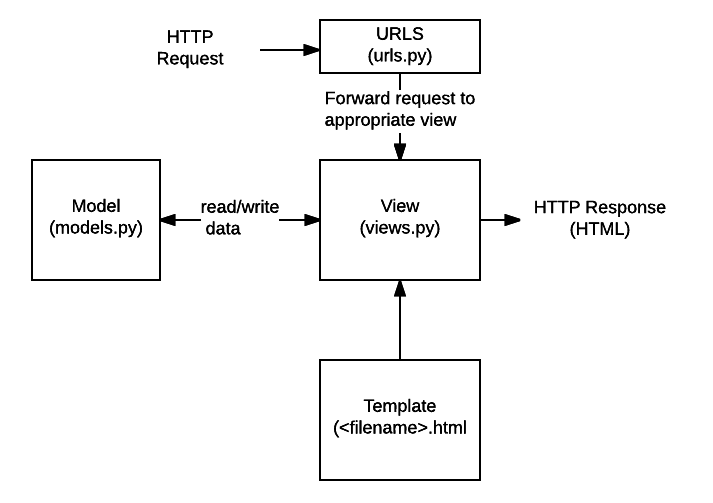

A Django App is a module that provides a specific feature or functionality within the project.
Unlike projects, apps are designed to be reusable.
You can build an app once and use it in multiple Django projects.
Creating an App
Inside a project, create an app using:
python manage.py startapp blogThis generates a structure like:
blog/
    admin.py
    apps.py
    models.py
    views.py
    tests.py
Important Components of an App
File Purpose models.pyDefines database structure views.pyHandles application logic admin.pyConfigures admin interface apps.pyApp configuration tests.pyUnit tests Developers often add additional folders:
templates/
static/
urls.py
forms.py
Each app focuses on one responsibility.
Real-World Example
Suppose you are building an online learning platform.
Django Project
learning_platform/This represents the entire website.
Django Apps
Inside the project you might create several apps:
users/        → user authentication
courses/      → course management
payments/     → payment processing
forum/        → student discussions
blog/         → learning articles
Each app is responsible for one feature of the platform.
A Simple Analogy
Think of a shopping mall.
Concept Example Django Project The entire shopping mall Django Apps Individual shops Settings Mall management rules Apps working together Shops serving customers The mall manages the infrastructure, while each shop performs a specific function.
Key Differences Between Project and App
Feature Django Project Django App Scope Entire website Specific functionality Quantity Usually one Many in a project Reusability Not reusable Reusable Created using startprojectstartappContains Global settings Business logic
Why Django Uses This Architecture
This design encourages modular development.
Benefits include:
- Easier maintenance
- Reusable components
- Better organization
- Scalable applications
- Clear separation of functionality
Large websites built with Django often consist of many independent apps working together.
Final Takeaway
The simplest way to remember the difference is:
Project = Entire Website
App = Feature or Module inside the WebsiteA Django project can contain many apps, and each app focuses on solving one specific problem.
Understanding this concept early will help you build clean, maintainable Django applications as your projects grow.
-
AuthorPosts

- You must be logged in to reply to this topic.